 Product Tabs Studio
Free WooCommerce plugin · GPLv2 or later · v1.0.0
WooCommerce product tabs that do not disappear when you save
Past max_input_vars, PHP throws away form fields without
saying so, and a tab plugin that writes whatever arrived overwrites
your content with nothing. Product Tabs Studio counts the rows it
rendered, compares them with the rows that came back, and refuses to
write when the two disagree.
No account, no e-mail address, no licence key. The free plugin is the whole plugin. WordPress 6.2+ · WooCommerce 7.0+ · PHP 7.4–8.3.
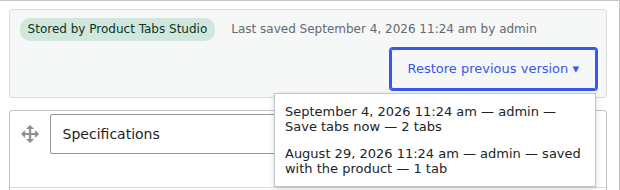
1:1 detail of screenshot-1.png · five versions per product, restorable
§00 Before you trust it
Everything on this page can be checked without asking us
The plugin is new and has no users to quote, so there are no ratings or install counts here. These are the things that exist instead.
Release product-tabs-studio 1.0.0
- Version
- 1.0.0 — the first public release
- Licence
- GPLv2 or later. Yours to keep, read, fork and modify.
- Source
- github.com/Carreraander/product-tabs-studio-plugin — the same code as the ZIP
- Commit log
- Every commit, with its date
- Download
- ZIP, 327 KB, served from this site
- SHA-256
c0f5ce1caf493c16b619e34263546c042f4a739fb2318e668072f7be6903edc6- Tests
- 305 automated tests in the plugin's own suite
- Measured on
- A catalogue of 2,000 products with 300 global tabs
- Network calls
- None by default. No analytics, no usage report, no licence check. On activation the Freemius SDK offers an optional notification opt-in; skipping it is fully supported. What it would share.
- Account
- None. Nothing to sign up for, nothing to activate.
- Requires
- WordPress 6.2+ (tested to 7.1), WooCommerce 7.0+, PHP 7.4–8.3, HPOS declared
- Written by
- Ander Carrera
Verify the checksum before installing: shasum -a 256 product-tabs-studio-1.0.0.zip on Linux or macOS, certutil -hashfile product-tabs-studio-1.0.0.zip SHA256 on Windows. The download page has both commands.
§01 The failure everyone in this category has met
Why product tabs vanish on save, and what stops it here
It is not a mystery and it is not your fault. It is one PHP setting, one silent truncation, and one plugin writing what it was handed.
-
Step 1 · the browser
The product form is posted
A product with many attributes, variations, custom fields and tab rows sends a lot of separate inputs. Passing a thousand is ordinary on a real catalogue.
Example: 1,214 fields sent
-
Step 2 · PHP
PHP stops reading at
max_input_varsThe default is 1,000. Everything after it is discarded before a single line of plugin code runs. No error, no warning to the shop owner, nothing in the log.
Example: 1,000 arrive · 214 dropped in silence
What normally happens next
The plugin writes what arrived
The truncated set is saved over the complete one. The tabs are gone, the only copy was the one just overwritten, and the save reported success.
What happens here
The counts are compared first
The plugin counts the rows it rendered and compares them with the
rows that arrived. If it rendered 42 and 31 came back, the write is
refused, the stored tabs stay exactly as they were,
and the notice names max_input_vars and how to raise it.
Two more layers sit behind it. With JavaScript on, the tabs travel in a single field and never meet the limit at all. And every save keeps the last five versions of a product's tabs, restorable from the product editor in one click — the menu in the detail at the top of this page.

1:1 detail. The guard reports itself, with your server's actual value. Drag sideways →
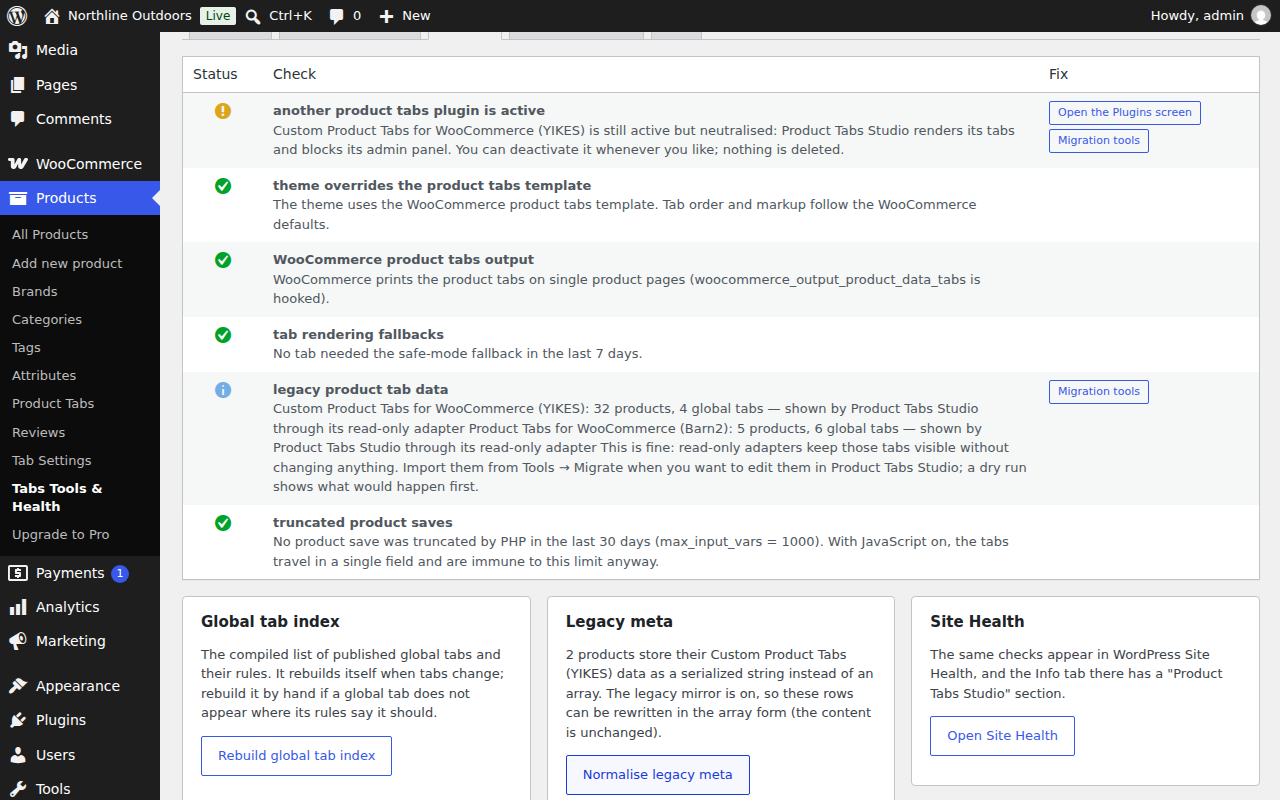
Six checks, each with the fix next to it. The same checks appear in WordPress Site Health, and the System report tab next door produces the text to paste into a support message. Shown at full size on a wide screen; the image is a 1280 × 800 PNG and the caption link opens it.
§02 What it does
Three screens do the work
1 Tabs on one product
Unlimited tabs per product, written in the WordPress editor, dragged into order, each with its own anchor key so a link can open a tab directly. Enable or disable a tab without deleting it.
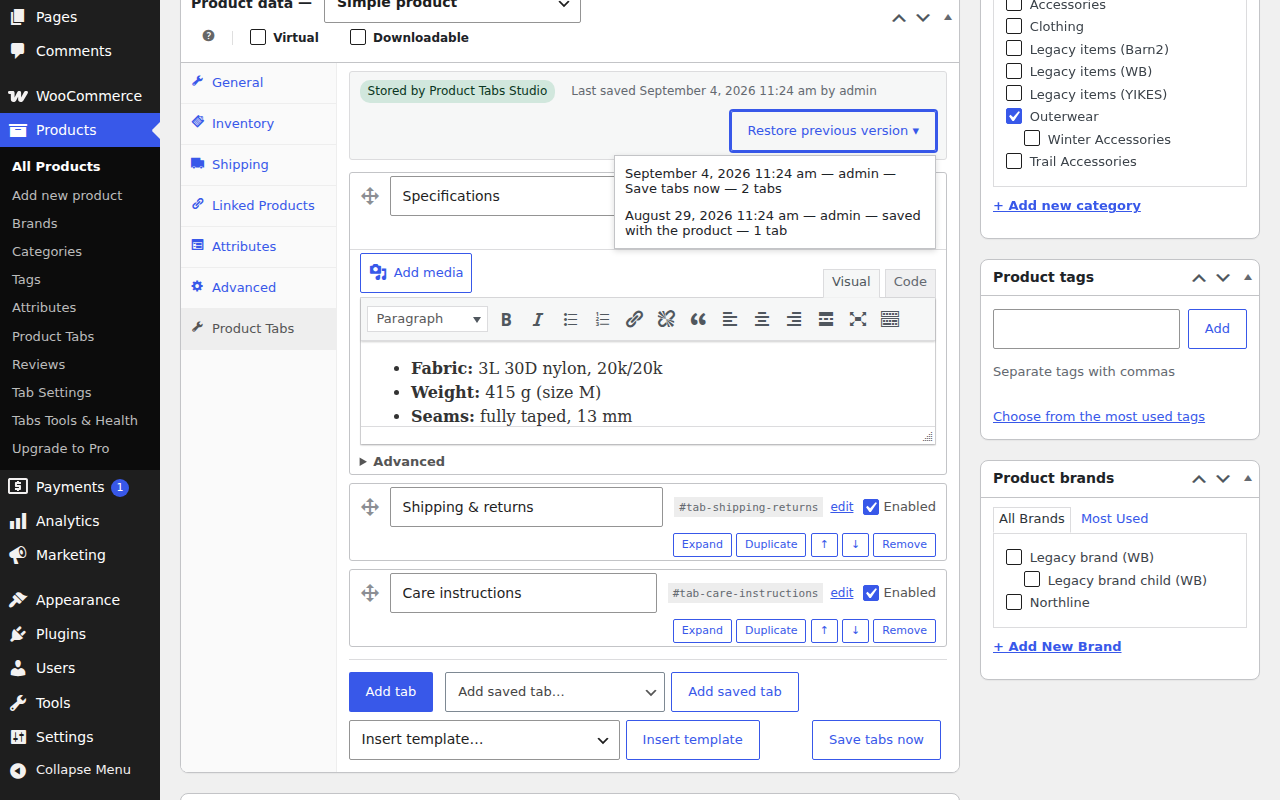
The panel you will actually work in. Add tab, add a saved tab, insert a template, save the tabs on their own without touching the rest of the product.
2 One tab across many products
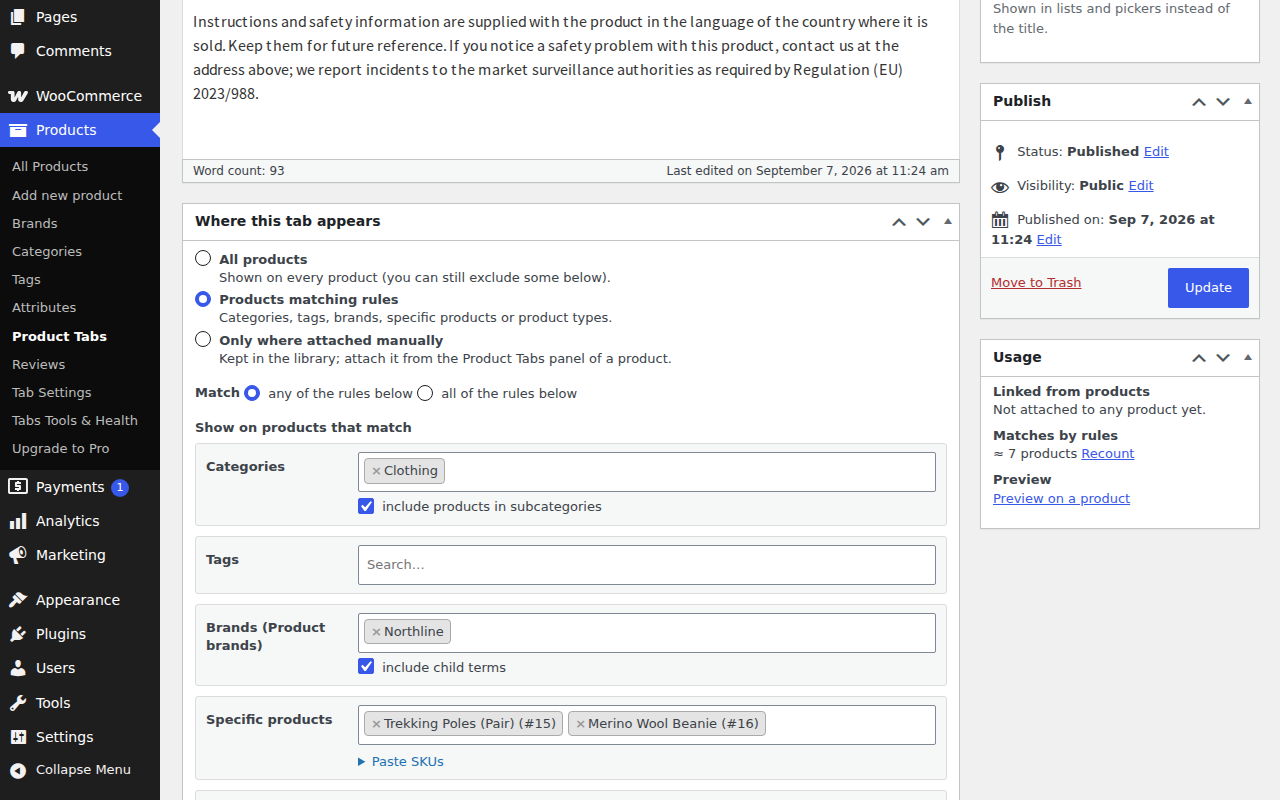
A global tab is a piece of content plus a rule. Rules combine categories (with or without their subcategories), tags, brands, specific products and product types, with an include list, an exclude list and a match mode of any or all. The sidebar counts the products that match before you publish.
- Brand rules work with WooCommerce Brands, Perfect Brands and YITH Brands
- Any single product can hide a global tab, or replace its content locally, without touching the tab the other products use
- Rules by attribute, price, stock, shipping class, SKU, user role and schedule are the paid tier
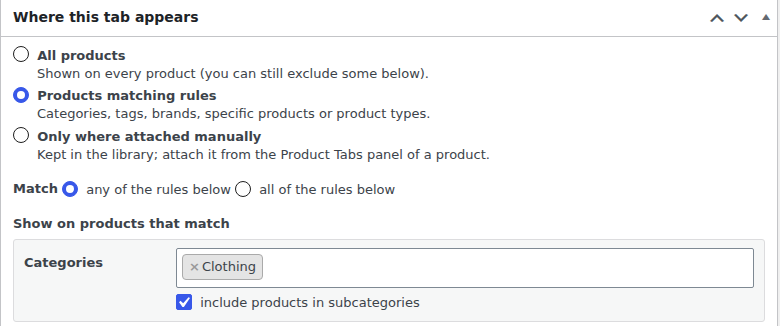
1:1 detail of screenshot-2.png. The Usage box on the full screen counts the products a rule matches before anything is published. Drag sideways →
3 Every tab, and where each one lands
The list screen shows each tab's key, the rule that places it, its priority, how many products use it, and where it came from — including tabs that are still stored by another plugin and rendered through a read-only adapter. Filter by placement or by origin, duplicate a tab, keep one as a draft, or trash it without touching a single product.
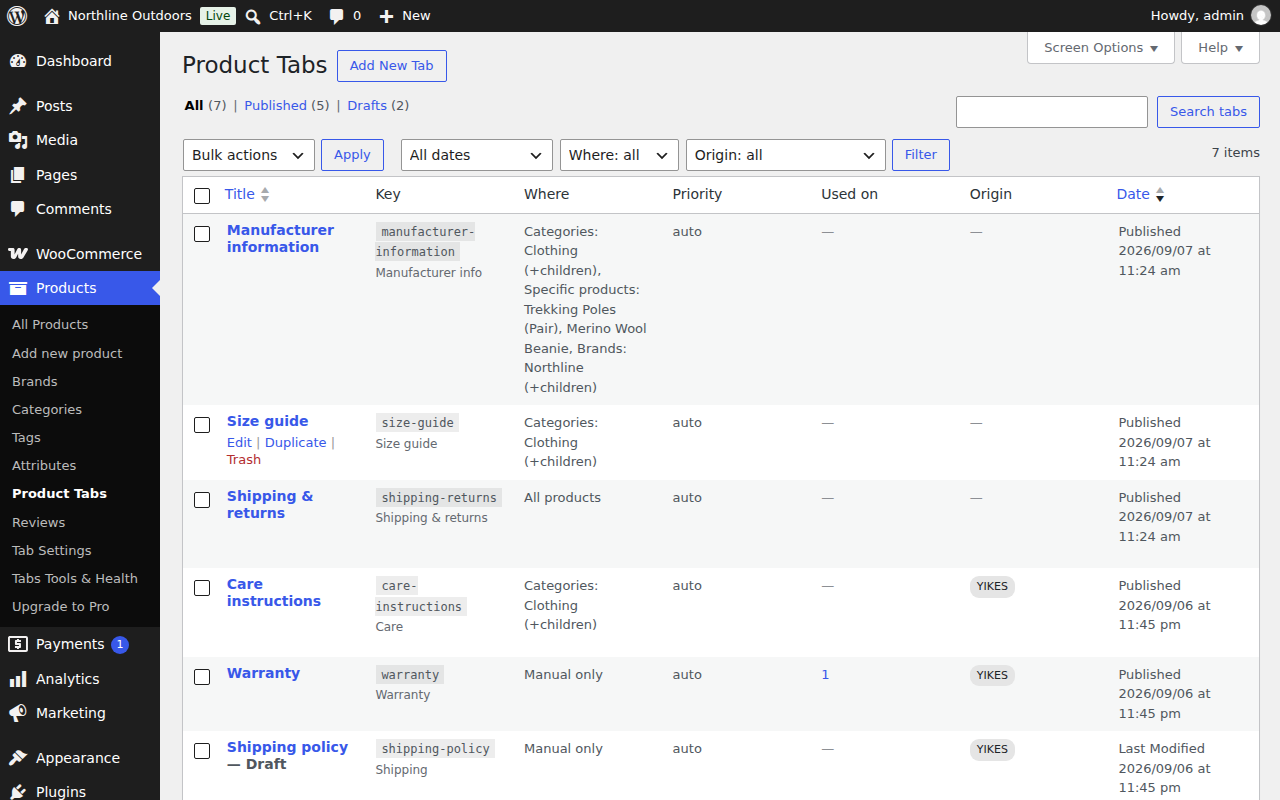
The Origin column marks the three tabs that still live in another plugin's tables. They render on the storefront exactly the same way, and nothing has been converted.
Against what you have today
| Capability | WooCommerce alone | Product Tabs Studio, free |
|---|---|---|
| Extra tabs on a product | Three fixed tabs | Unlimited, WordPress editor, drag to reorder, own anchor keys |
| One tab across many products | Copy it into each product | Rules: category with subcategories, tag, brand, specific products, product type, include and exclude |
| Rename, hide or reorder the default tabs | Only in code | One screen, with a reset to the WooCommerce values |
| Version history of a product's tabs | None | Last five versions, one-click restore |
| Guard against a truncated form save | None | Nothing is written, and the notice names the PHP setting |
| Tabs stored by YIKES, Barn2 or WB | Not shown at all | Rendered read-only; optional dry run, migrate, verify, rollback |
Table scrolls sideways →
§03 Switching
It reads the tabs you already have, where they already are
Install it beside your current tab plugin. Deactivate the old one when you feel like it. The storefront keeps showing what it showed before, with the same order, keys and CSS classes, because the tabs are read straight out of the other plugin's own rows through a read-only adapter. There is no migration step you have to complete first.
Converting that data into native storage is a separate, optional decision, and every step of it is resumable and reversible:
- Dry run reports what would happen and writes nothing
- Migrate writes native copies, leaving the originals in place
- Verify compares both renderings tab by tab
- Rollback removes exactly what was created
- The other plugin's rows are never modified by any of these steps, so you can uninstall this plugin and be back where you started
- Each run produces a downloadable report you can keep
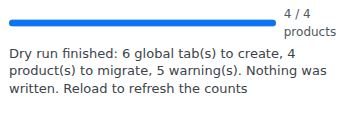
1:1 detail of screenshot-5.png
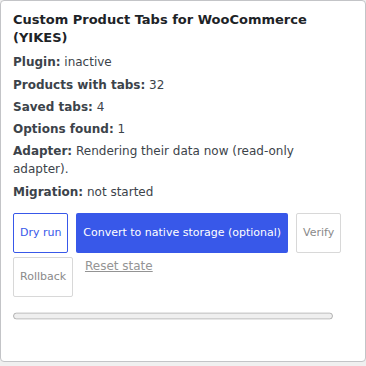
1:1 detail · thirty-two products still served from the old plugin's rows
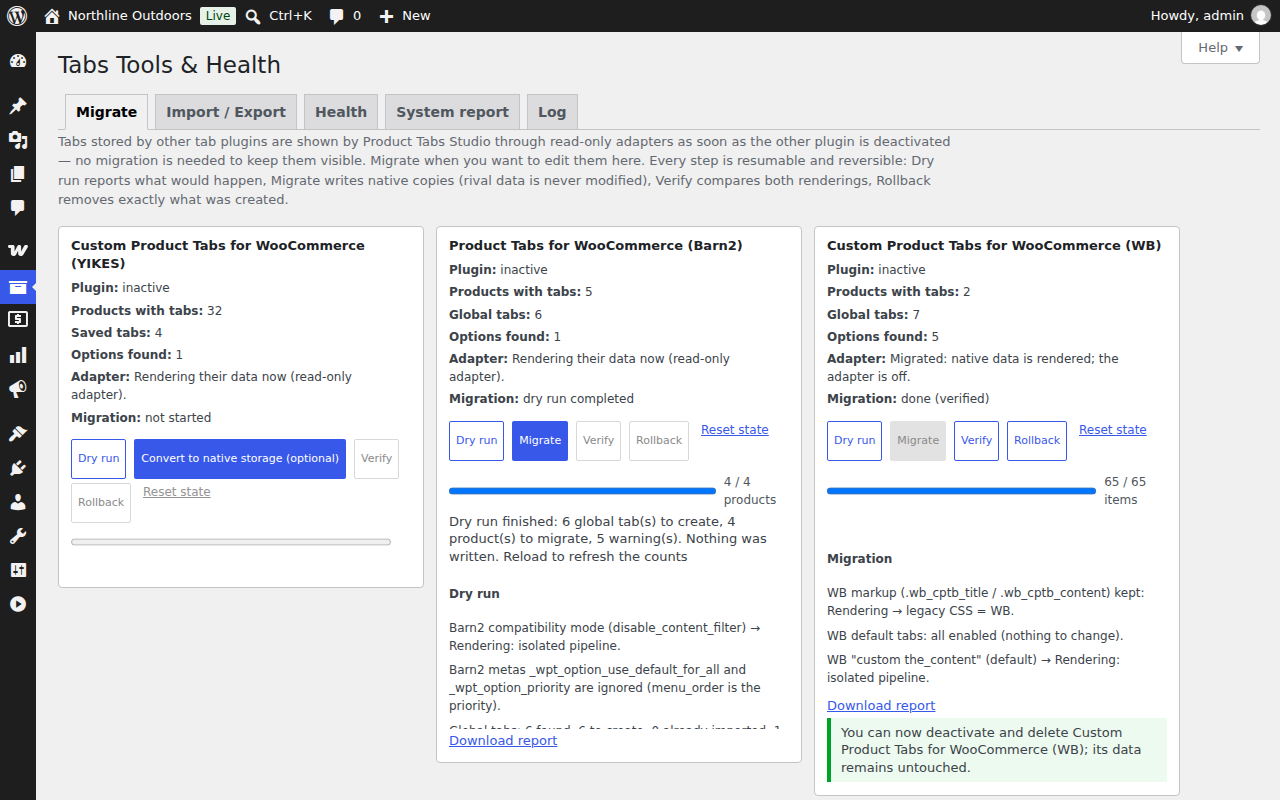
One shop, three sources, three different decisions. The WB tabs have been migrated and verified, the Barn2 tabs have had a dry run only, and the YIKES tabs have not been touched at all — they are still rendered read-only, which is a perfectly good place to stop.

1:1 detail. The plugin says when it is safe to delete the old one, and not before.
Coming from a specific plugin?
§04 Order and result
Your WooCommerce tabs keep their place, and the theme keeps its styling
Description, Additional information and Reviews keep the priorities WooCommerce gives them unless you move them yourself. New custom tabs go before Reviews by default; that slot can move to the top, after the description, or after everything else. One button puts all three back to the WooCommerce values.
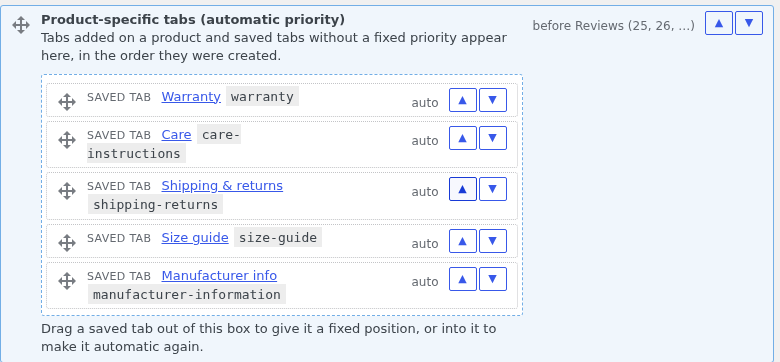
1:1 detail of screenshot-4.png. Every custom tab sits in one movable slot until you drag it out and pin it. Drag sideways →
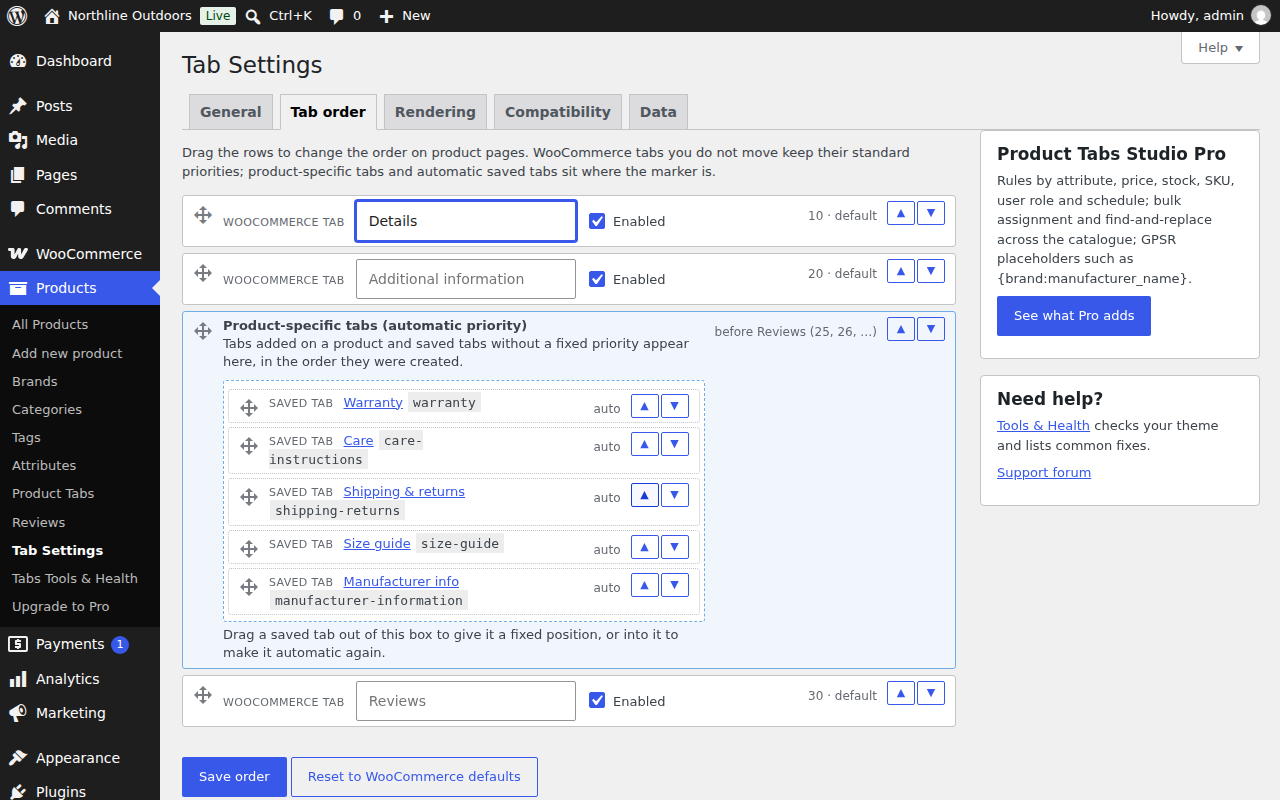
Rename, hide or reorder the default tabs — or leave them exactly as WooCommerce set them. More about tab order.
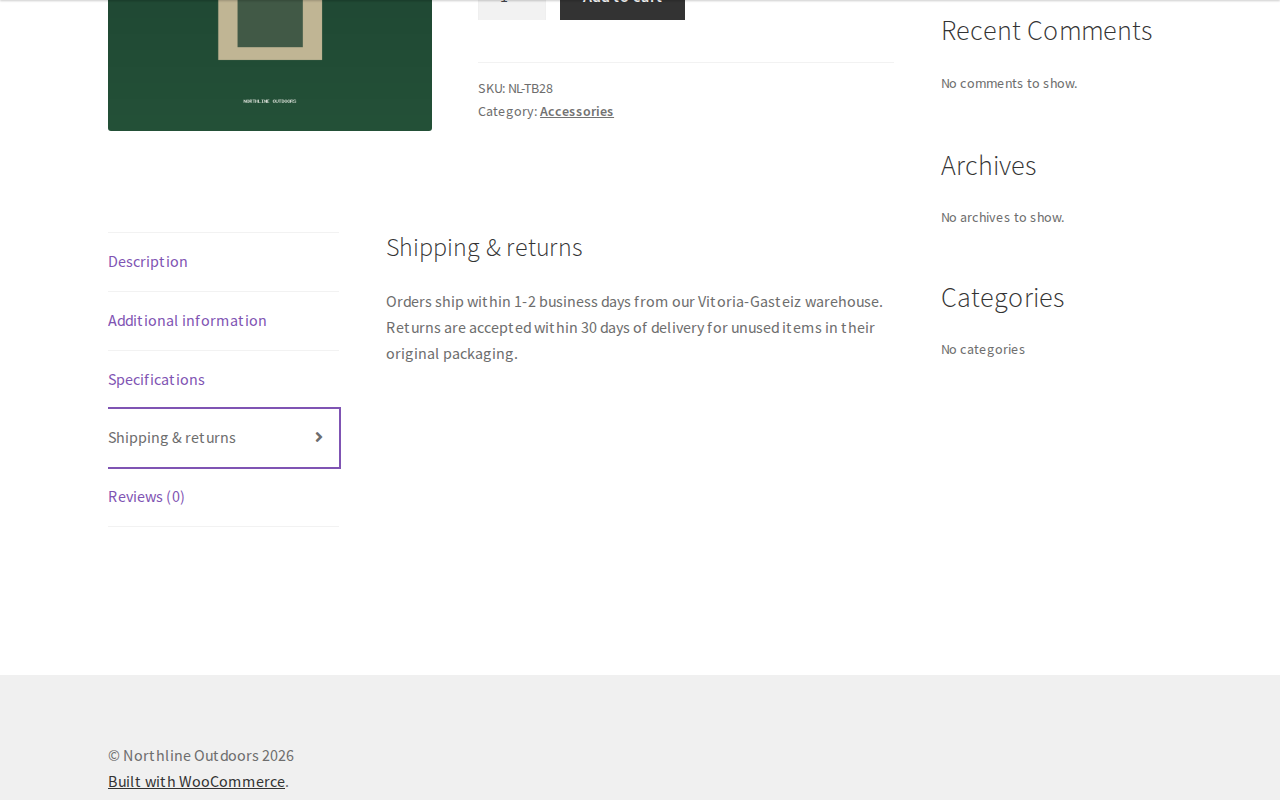
The result for the shopper, on a bare test install with an empty sidebar and no reviews — that is what it is, and dressing it up would defeat the point. The theme styles the custom tabs like any other tab, because they are any other tab.
§05 Requirements and compatibility
What it needs, and what it has been run against
- WordPress
- 6.2 or newer, tested up to 7.1.
- WooCommerce
- 7.0 or newer. HPOS (high-performance order storage) declared compatible.
- PHP
- 7.4 to 8.3. The code contains no PHP 8-only syntax.
- Themes
- Classic themes and block themes. In a block theme the tabs appear in the Product Details block.
- Page builders
- Elementor, Divi, Bricks and WPBakery are detected, with the shortcodes
[ptstudio_tabs]and[ptstudio_tab]for layouts that dropped the default tabs entirely. - Translation
- WPML and Polylang configuration included (
wpml-config.xmland translated-field mapping). - Scale
- Measured on 2,000 products with 300 global tabs. Resolving one product's tabs reads one post meta value, one option and the product's terms.
- Safe from
- Quick edit, bulk edit, the CSV importer, the REST API and the block editor never reach the tab meta at all.
- For developers
- Shortcodes, filters, template overrides in the theme, a system report to paste into a ticket, JSON export and import between staging and production. Documentation.
§06 Price
Free is the whole plugin. Pro is for catalogue-scale editing.
No trial, no feature that expires, no account. Pro is a separate add-on that needs the free plugin installed and does nothing on its own.
Product Tabs Studio Free
0 EURDirect download. No account, no e-mail address, no key.
- Unlimited tabs per product; global tabs by category, tag, brand, product type or a named list
- Verified saving, the truncated-form guard, five versions of history per product
- Read-only adapters for three other tab plugins, plus dry run, migrate, verify and rollback
- JSON export and import, WooCommerce CSV column, GPSR and other templates
- Tools & Health, system report, Site Health checks, activity log, shortcodes and filters
In the screenshots above, the free plugin mentions Pro in two places: one entry at the bottom of the Products menu and one card in the Tab Settings sidebar. There is no banner across the tab panel.
Product Tabs Studio Pro Add-on
89 EUR / yearOne site. VAT added at checkout. 189 EUR for five sites, 349 EUR for twenty-five.
Worth it when opening products by hand has stopped being realistic:
- Rules by attribute, price, stock, shipping class, SKU, user role and schedule
- Bulk assignment and find-and-replace across a whole catalogue, with a preview before it runs and an undo after
- Per-brand placeholders such as
{brand:manufacturer_name}, so a manufacturer block filled in once appears on every product of that brand
Nothing that is free today moves into Pro. If a licence lapses, Pro stops adding its features and updates stop arriving; your tabs, rules and settings are untouched and the free plugin carries on.
§07 Before you install anything
The questions you are actually asking
Will I lose the tabs I already have?
No. Activate Product Tabs Studio and deactivate your old tab plugin: your tabs are read directly from where they already are, with their existing order, keys and CSS classes. That alone keeps the storefront working, and there is no migration step you have to complete first.
Copying that data into native storage is a separate, optional decision, and it is reversible: dry run, migrate, verify, rollback. The other plugin's rows are never modified by any of those steps, so you can uninstall this plugin and go back to where you started.
How do I know this one will not be abandoned too?
The honest signals, first. The whole plugin is published at github.com/Carreraander/product-tabs-studio-plugin, so the commit history shows whether work is happening, on dates you can read yourself rather than a claim on a sales page. It is written and maintained by one named person, Ander Carrera,; support e-mail reaches him directly. Version 1.0.0 is the first public release, so there is no long track record to point at, and pretending otherwise would be the first lie on this site.
Then the part that matters more, because nobody can promise you the future: being abandoned would not trap you.
- It is GPLv2 or later. You have the source. You, or any developer you hire, can keep it running or change it.
- Your tabs live in your own database, and JSON export gets all of them out in one click.
- The free plugin does not depend on a licence server. Nothing stops working if a payment stops.
- The read-only adapters exist precisely because leaving a plugin should not cost you your content — and that principle applies to this one as well.
Do you have reviews, ratings or install counts to show me?
No. The plugin is new and has no users to quote, so there are no figures on this page and none have been invented. Judge it the way you would judge any code you are about to run: read the repository, check the checksum, install it on staging, and see whether the screenshots above match what you get. When there are real numbers, they will be published with their source.
What does it really cost?
The plugin is free, complete, and stays free. Pro is 89 EUR a year for one site, 189 EUR for five, 349 EUR for twenty-five; VAT is added for your country at checkout, or removed if you enter a valid EU VAT number. At the checkout you choose whether it renews automatically or is a single payment for one year.
Freemius is the reseller and merchant of record: they take the payment on their own domain, issue the invoice, handle VAT and answer billing questions, refunds included. We never see your card details. The pricing page spells out what happens when you press the button.
Does it phone home or track anything?
By default the plugin sends no data: no analytics call, no usage report, no licence check. The one exception is the screen the Freemius SDK shows when you activate it, which asks whether you want update and security notifications; it is optional, skipping it is a supported state, and the privacy page lists exactly what accepting would share. This website makes no third-party request at all — no web font, no CDN, no analytics — which you can confirm in your browser's network panel. Buying Pro is a separate matter, and the privacy page covers what Freemius handles there too.
My theme is a block theme, or the product page is built with a page builder.
Both are handled. In a block theme the tabs appear in the Product Details block. When a builder takes over the single-product template, the plugin detects Elementor, Divi, Bricks and WPBakery and tells you which rendering mode to use; the shortcodes [ptstudio_tabs] and [ptstudio_tab] cover layouts that dropped the default tabs entirely.
Is it fast enough for a large catalogue?
It was measured on a catalogue of 2,000 products with 300 global tabs. Resolving a product's tabs reads one post meta value, one option and the product's terms.
§08 Get it
Install it beside your current tab plugin and see for yourself
Your existing tabs keep rendering, nothing is deleted, and if you disagree with the result you deactivate it and you are exactly where you started.
GPLv2 or later · SHA-256 published · no data sent unless you opt in · WordPress 6.2+ · WooCommerce 7.0+ · PHP 7.4–8.3