 Product Tabs Studio
Migrating from another tab plugin
Product Tabs Studio reads the data of three other WooCommerce tab plugins. Nothing has to be imported for those tabs to keep appearing, and nothing belonging to the other plugin is ever modified.
Guides by source
-
Custom Product Tabs for WooCommerce (YIKES)
Read-through with the original ordering and markup, saved tabs copied into the library, optional conversion, and what its uninstall routine deletes. See also: its Pro add-on can no longer be bought.
-
Product Tabs for WooCommerce (Barn2)
Field-by-field mapping of its tab posts, category conditions and per-product overrides.
-
WB Custom Product Tabs
Its tab posts and taxonomy assignments, per-product rows, WB heading markup and shortcode aliases.
How the adapters work
An adapter is a read-only reader for another plugin's storage. When a product has no tabs of its own in Product Tabs Studio, the adapters are asked in turn and their output is rendered as if it were native. A product that does have native tabs is never touched by an adapter.
An adapter is active when three things are true: the other plugin's data is present, the other plugin is inactive, and its migration has not been marked as done. While the other plugin is active it renders its own tabs and this one stays out of the way, so tabs are never printed twice. The exception is Custom Product Tabs for WooCommerce (YIKES): when it is active alongside this plugin, its rendering and its admin panel are switched off so that only one plugin writes to that data.
Detection is cached for twelve hours and refreshed on activation, when you open the Tools screen, after each migration step and whenever one of those plugins is activated or deactivated.
Dry run, migrate, verify, rollback
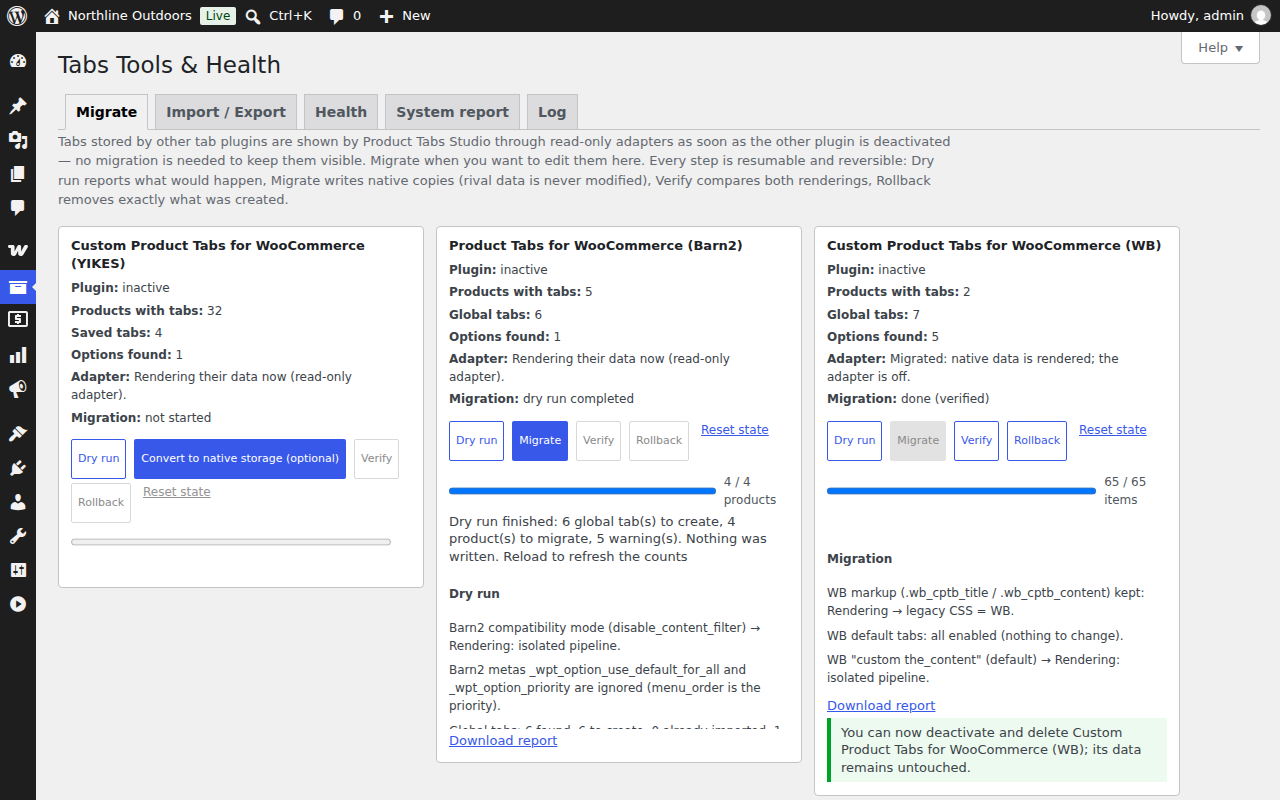
Everything runs from Products → Tabs Tools & Health → Migrate, in batches of fifty items, resumable if you close the page.
- Dry run
- Counts what would be created and lists warnings: keys that collide with WooCommerce defaults, duplicate keys on one product, empty titles, content that sanitising would change and by how much, and the quirks specific to each source. Writes nothing.
- Migrate
- Creates the global tabs first, then writes the per-product data. Every product write goes through the normal save path, so the state before the migration lands in that product's version history. Products that were already migrated are skipped unless you ask for a redo.
- Verify
- Renders every migrated product twice — once through the adapter, once from the native data — and compares the ordered tab keys, the titles and a checksum of each rendered panel. Differences are listed with links to the products. After a clean verification the adapter is switched off, because the native data is now the source of truth.
- Rollback
- Deletes exactly what the migration created: the global tabs it made, and the native tab data of products whose most recent history entry is still the migration itself. A product you edited by hand afterwards is kept and listed by name. The adapter is switched back on.
Each source also has a Download report link and a Reset state action that clears the recorded progress without touching data.
What happens to the content itself
Tab content is imported verbatim when the person running the migration is allowed to post unfiltered HTML — an administrator on a single site. Otherwise it is sanitised on the way in with the same rules WordPress applies to post content, and the report counts what was changed so you can see it rather than discover it later.
Serialized values from the older storage formats are decoded through a reader that rejects object and class tokens, caps the size it will process and never throws. It is the only place in the plugin where anything is unserialized.
Moving tabs between sites
Migration is for other plugins' data. To move your own tabs between staging and production, use Tools & Health → Import / Export, which writes a JSON bundle of the settings, the global tabs and the per-product tabs. Import matches global tabs by key and products by SKU and then by id, offers merge and replace modes and a dry run, and records an entry in each product's history. See Tools, health and data.
Other tab plugins
Version 1.0 reads the three sources listed above. If your tabs come from somewhere else, the JSON bundle used by Import / Export is a plain structure you can produce by hand — export a site with a couple of tabs on it to see the shape — and the support forum is the place to ask about a source that is not covered.